South Florida DC Jack & Charging Port Repair – MagSafe, USB-C & Power Jack
Professional DC jack repair and power port replacement for all laptop brands including MacBook MagSafe, USB-C, Dell, HP, Lenovo, Asus, Acer, Samsung, MSI, and more. We fix loose, broken, or non-functional charging ports with expert soldering. Serving Fort Lauderdale, Miami, Boca Raton and all of South Florida. Onsite & mail-in service available.
Why South Florida Chooses CCRS for DC Jack & Charging Port Repair
Expert power port repair with professional soldering techniques for MagSafe, USB-C, and traditional barrel-style DC jacks. We fix charging issues that other shops can't, with transparent service and a satisfaction guarantee.
Expert Soldering
Professional DC jack soldering and replacement for all port types including MagSafe, USB-C, and barrel connectors.
All Brands Supported
We repair DC jacks on all major brands including Apple, Dell, HP, Lenovo, Asus, Acer, Samsung, MSI, and Toshiba.
Onsite & Mail-In
We come to your home or office in South Florida. Mail-in service available for customers nationwide.
900+ 5-Star Reviews
Rated 5.0 on Google and Yelp. Our customers trust us for fast, reliable, and professional power jack repair.
Our DC Jack & Charging Port Repair Services
From loose charging ports to completely broken power jacks, we provide expert repair services for all laptop makes and models. We handle everything from MagSafe and USB-C to traditional barrel-style power jacks.
MacBook MagSafe Port Repair
Expert repair for MacBook MagSafe 1, MagSafe 2, and MagSafe 3 (USB-C) charging ports. Loose connections, broken pins, no power, and intermittent charging issues resolved.
USB-C Charging Port Repair
Specialized USB-C port repair for MacBook, Dell, HP, Lenovo, Asus and more. We fix loose, broken, or non-functional USB-C power ports with precision soldering.
Dell & HP Power Jack Repair
Specialized DC jack repair for Dell and HP laptops. We fix broken, loose, and non-functional power ports on all models including Inspiron, Latitude, XPS, Pavilion, and Envy.
Lenovo & Asus DC Jack Repair
Professional power port replacement for Lenovo ThinkPad, IdeaPad, Yoga and Asus ROG, ZenBook, and VivoBook laptops. Fast turnaround with genuine parts.
Gaming Laptop Power Port Repair
Heavy-duty DC jack repair for gaming laptops including MSI, Alienware, ROG, and Predator. We handle high-power charging ports with precision soldering.
Motherboard Soldering Services
When the DC jack is soldered directly to the motherboard, we perform precision micro-soldering to replace or repair the power connector without damaging other components.
Charger & Adapter Testing
We test your charger and AC adapter to ensure it's functioning properly. Sometimes the issue is with the charger, not the DC jack – we'll diagnose the root cause.
Traditional DC Jack Repair
Repair and replacement for traditional barrel-style DC jacks found on most Windows laptops. We fix loose connections, broken pins, and non-charging issues.
Same-day DC jack repair in South Florida — we come to you in Fort Lauderdale, Miami, Boca Raton, and all surrounding areas. Warranty varies per service (up to 6 months). Call (754) 234-5598 for immediate help.
Understanding MagSafe & USB-C Charging Port Issues
MagSafe Port Repair
MagSafe ports are Apple's magnetic charging connectors used on MacBook models from 2006 to 2021. Common issues include:
- No connection – The charger doesn't light up or connect at all
- Intermittent charging – The connection drops in and out
- Broken pins – Physical damage to the magnetic pins
- Loose connection – The charger doesn't stay securely attached
- Overheating – The port gets hot when charging
We repair all MagSafe generations: MagSafe 1 (T-style connector), MagSafe 2 (L-style connector), and MagSafe 3 (USB-C-based).
USB-C Charging Port Repair
USB-C ports are the modern standard for charging and data transfer on most new laptops. Common issues include:
- No power – The laptop won't charge via any USB-C port
- Loose connection – The cable doesn't stay securely inserted
- Data transfer issues – The port works for charging but not data
- Broken center pin – Physical damage inside the USB-C port
- Excessive wear – Frequent plugging/unplugging has worn out the port
We repair USB-C ports on MacBook, Dell, HP, Lenovo, Asus, and all other brands. USB-C ports are delicate and often require professional soldering to repair.
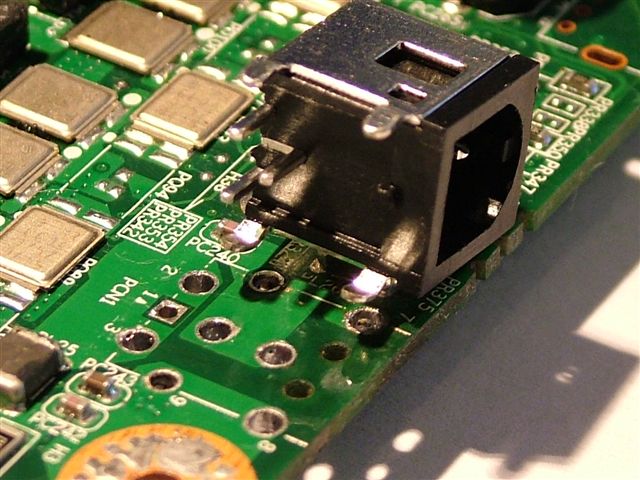
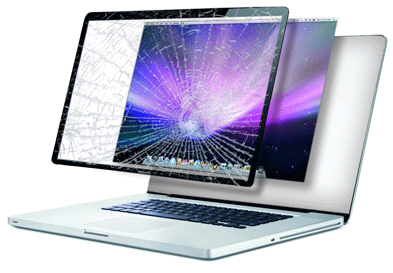
Common Causes of DC Jack & Charging Port Failure
Understanding why charging ports fail can help you prevent future issues. Here are the most common causes we encounter:
- Physical damage – Dropping the laptop while the charger is connected, or tripping over the power cord.
- Loose connections – Frequent plugging and unplugging can loosen the internal solder joints over time.
- Bent or broken pins – Inserting the charger at an angle can bend or break the internal pins, especially in MagSafe ports.
- Poor quality chargers – Using non-genuine or damaged chargers can damage the DC jack.
- Power surges – Electrical surges can cause damage to the power port and motherboard.
- Wear and tear – Normal use over several years can cause the DC jack to wear out, especially USB-C ports.
- Dust and debris – Accumulated dust in the port can interfere with the connection and cause damage over time.
How to prevent DC jack and charging port damage:
- Use a quality charger – Always use the manufacturer's recommended charger or a high-quality replacement.
- Avoid pulling at an angle – Insert and remove the charger straight in and out.
- Don't move the laptop while charging – If you need to move your laptop, unplug it first.
- Use a surge protector – Protect your laptop from electrical surges.
- Clean the port regularly – Use compressed air to gently remove dust and debris from the charging port.
- Get regular inspections – If you notice any charging issues, bring it in early before the problem worsens.
- For MagSafe users: Don't let the magnetic connector snap onto the port from a distance – guide it in gently.
- For USB-C users: Be gentle when plugging and unplugging – avoid wiggling the cable.










What is a laptop DC jack and what does it do? Most Popular
A DC jack (also called a power jack, charging port, or power connector) is the physical port on your laptop where you plug in the AC adapter (charger). It's the interface that transfers electrical power from the charger to the laptop's motherboard, which then charges the battery and powers the system.
DC jacks come in several types:
- Barrel-style jacks – The traditional round connector found on most older and many current Windows laptops.
- MagSafe jacks – Apple's magnetic connector (MagSafe 1, 2, and 3) that attaches magnetically.
- USB-C jacks – The modern universal connector used for charging and data on newer laptops.
DC jacks are typically soldered directly to the motherboard or connected via a separate cable. When a DC jack fails, the laptop may not charge, may only charge when the charger is held at a specific angle, or may show no signs of power at all.
Do you repair MacBook MagSafe charging ports? Apple Expert
Yes! We specialize in MacBook MagSafe port repair for all models and generations:
- MagSafe 1 – The original T-style connector used on MacBook Pro and MacBook (2006-2012)
- MagSafe 2 – The thinner L-style connector used on MacBook Pro Retina and MacBook Air (2012-2015)
- MagSafe 3 – The USB-C based MagSafe connector used on MacBook Pro and MacBook Air (2021+)
Common MagSafe issues we fix include: no connection, intermittent charging, broken pins, loose connections, overheating, and physical damage to the port.
We use genuine or high-quality replacement parts and professional soldering techniques to ensure a reliable, long-lasting repair.
Do you repair USB-C charging ports? Modern Tech
Yes! We repair USB-C charging ports on all laptop brands including:
- Apple MacBook – MacBook, MacBook Air, MacBook Pro (2015+)
- Dell – XPS, Latitude, Inspiron (USB-C models)
- HP – Spectre, Envy, EliteBook (USB-C models)
- Lenovo – ThinkPad, Yoga, IdeaPad (USB-C models)
- Asus – ZenBook, ROG, VivoBook (USB-C models)
- Samsung, MSI, Acer, and more
Common USB-C issues we fix include: no power, loose connection, data transfer issues, broken center pin, and excessive wear from frequent plugging/unplugging.
USB-C ports are delicate and often require professional soldering to repair. We use precision tools and techniques to ensure a secure connection.
What are the signs of a failing DC jack or charging port? Know the Signs
If you notice any of these symptoms, your laptop's DC jack or charging port may be failing and requires professional repair:
- Laptop only charges when the charger is held at a certain angle – This is the most common sign of a loose or damaged DC jack.
- Intermittent charging – The laptop charges on and off, or the charging indicator flickers.
- Charger plug feels loose – The charger doesn't fit securely into the port.
- Laptop doesn't charge at all – Despite trying different chargers, the laptop won't charge.
- Physical damage to the port – Bent pins, cracks, or visible damage around the charging port.
- Burning smell or heat from the port – This indicates a serious electrical issue that requires immediate attention.
- Laptop suddenly shuts off when the charger is moved – The connection is unstable and can cause power loss.
- For MagSafe: The connector doesn't click into place or the LED doesn't light up.
- For USB-C: The cable doesn't stay securely inserted or the port wobbles.
Which laptop brands do you repair DC jacks for? All Major
We repair DC jacks and charging ports on all major laptop brands and many lesser-known ones. Our expertise covers:
- Apple: MacBook, MacBook Pro, MacBook Air – MagSafe 1, 2, 3 and USB-C ports
- Dell: Inspiron, Latitude, XPS, Precision, Alienware
- HP: Pavilion, Envy, Spectre, EliteBook, ProBook, OMEN
- Lenovo: ThinkPad, IdeaPad, Yoga, Legion, LOQ
- Asus: ROG, ZenBook, TUF, VivoBook, ProArt
- Acer: Predator, Nitro, Aspire, Swift, Spin
- Samsung: Galaxy Book, Odyssey
- MSI: All gaming and workstation models
- Toshiba: Satellite, Portege, Tecra
- Sony: VAIO Series
- Gateway, Compaq, Fujitsu, and more
If you don't see your brand listed, just ask – we likely service it too.
What is involved in DC jack soldering? Expert Technique
DC jack soldering is a specialized repair technique used when the power port is soldered directly to the motherboard. The process involves:
- Diagnosis: We test the DC jack and motherboard to confirm the issue.
- Disassembly: We carefully disassemble the laptop to access the motherboard.
- Desoldering: Using precision tools, we remove the old or damaged DC jack from the motherboard.
- Cleaning: We clean the solder pads and prepare the board for the new jack.
- Soldering: We solder the new DC jack onto the motherboard using professional-grade equipment.
- Testing: We reassemble the laptop and thoroughly test the new connection.
This is a delicate procedure that requires experience and precision. Our technicians are trained in micro-soldering techniques and use high-quality equipment to ensure a reliable, long-lasting repair.
Do you offer warranty on DC jack repairs? Up to 6 Months
We stand behind our work. Our warranty varies per service and can extend up to 6 months depending on the type of repair. For example:
- DC jack replacement (cable type): Warranty on the part and labor – typically 90 days.
- DC jack soldering (motherboard type): Warranty on the soldering work – typically 90 days.
- MagSafe and USB-C port repairs: Warranty on the port replacement and soldering – typically 90 days.
- Complex motherboard soldering: Warranty period determined on a case-by-case basis.
We'll clearly explain the warranty coverage for your specific service before we begin. Contact us for full details.
How can I prevent DC jack and charging port damage? Prevention Tips
Preventing charging port damage is easier than fixing it. Here are some tips to extend the life of your laptop's charging port:
- Use the correct charger: Always use the manufacturer's recommended charger or a high-quality certified replacement.
- Insert and remove carefully: Pull the charger straight out – never yank or pull at an angle.
- Avoid moving the laptop while charging: If you need to move your laptop, unplug it first.
- Keep the port clean: Dust and debris can interfere with the connection. Use compressed air to clean the port gently.
- Use a surge protector: Protect your laptop from electrical surges that can damage the power port.
- Don't leave the charger plugged in while transporting: This puts stress on the DC jack and can cause damage.
- For MagSafe users: Don't let the magnetic connector snap onto the port from a distance – guide it in gently to prevent pin damage.
- For USB-C users: Be gentle when plugging and unplugging – avoid wiggling the cable, as USB-C ports are particularly delicate.
- Consider a magnetic adapter: Some aftermarket magnetic adapters can reduce stress on the DC jack by breaking away when pulled.
- Get regular inspections: If you notice any charging issues, bring it in early before the problem worsens.
FIND A LOCAL DC JACK REPAIR SERVICE NEAR YOU - Serving all South Florida communities. Click any city above for local service details.
Need a DC Jack or Charging Port Repair? Call Us Now
Same-day DC jack repair in South Florida. MagSafe, USB-C, and traditional power ports. Professional soldering. Warranty varies per service (up to 6 months).